
Guides
Home inspection software and the KPIs it should report for 2027
Home inspection software should track turnaround, defect disputes and cost per inspection, not generic benchmarks borrowed from other trades.
What to take away
- Home inspection software must run the inspectionmobile report writing, photo annotation, an electronic pre-inspection agreement, and a PDF report.
- Spectora, HomeGauge, ISN, InspectIT and Home Inspector Pro split the market by firm size. Entry plans typically run from about $99 to $199 per month per user as of 2026, with one-time license options under $1,000.
- For 2027, the software should report median turnaround time, same-day delivery rate, report revision rate and re-inspection rate.
- It should also report cost per inspection, software cost per inspection, dispute count and revenue per inspector.
- Run the report on the same calendar days each month, from the same data source, so the trend means something.
- Confirm licensing, radon and mold rules with your state board or a certified industrial hygienist before you promise a service.
This article covers business operations for inspection firms. It is not engineering, environmental, legal, tax or insurance advice. Scope and duties depend on your jurisdiction, your standard of practice, and the property. Confirm current requirements with your state licensing board. You can also consult a licensed attorney, a CPA, or a qualified professional engineer.
What the software actually has to do
Home inspection software is not a generic job-management tool with a new label. It has to carry the inspection.
That means a mobile app that works without signal in a crawlspace. Photos must land in the right section of the report. A comment library lets an inspector pull wording without retyping.
The pre-inspection agreement is signed electronically before the inspector starts. The report is delivered as a PDF the client can forward to their agent.
Anything that does not do those four things is an add-on, not the core system. Buy the core first.
Home inspection software to shortlist for 2027
Software to shortlist for 2027
What it does
- Spectora
- Mobile-first report writing, photo annotation, agreement signing, scheduling
- HomeGauge
- Report writing plus a client portal and agent-facing tools
- Inspection Support Network (ISN)
- Scheduling, agreements, payments, and back-office workflow
- InspectIT
- Report writing with a comment library and mobile app
- Home Inspector Pro
- Desktop and mobile report writing, template editing
Who it suits
- Spectora
- Solo inspectors and small firms that want one system
- HomeGauge
- Firms with a steady agent referral base
- Inspection Support Network (ISN)
- Multi-inspector firms that need office coordination
- InspectIT
- Inspectors who want a lighter, cheaper tool
- Home Inspector Pro
- Inspectors who want deep control over their own template
Pricing model and typical entry cost as of 2026
- Spectora
- Per-inspection or monthly subscription; entry plans typically $109 to $149 per month for one inspector
- HomeGauge
- Monthly subscription, tiered by users; typical range $99 to $199 per month
- Inspection Support Network (ISN)
- Monthly subscription, priced per inspector; typical range $50 to $100 per inspector per month, plus setup
- InspectIT
- One-time or annual license; typical range $499 to $899 one time or $99 to $199 per year
- Home Inspector Pro
- One-time license plus support fee; typical range $499 to $899 plus $99 to $199 per year
Pricing changes. Get a current quote before you build a budget around any of these.
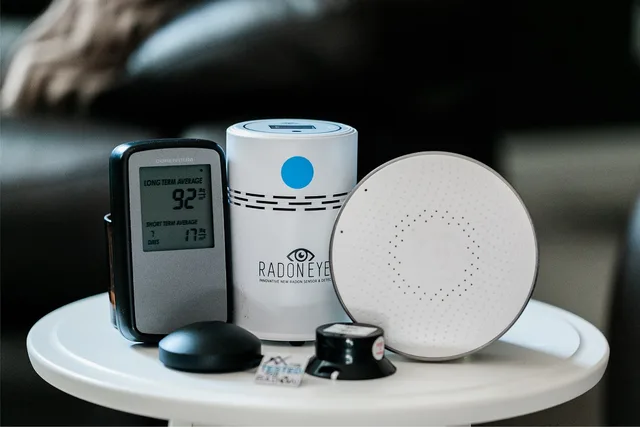
Two more names matter if you sell ancillary services. A radon test needs a device and a lab, and a mold sample needs a lab. Those are separate from the report software and are often billed through it.
For a longer comparison, see our review of the best home inspection software for 2027.
The KPIs home inspection software should report for 2027
Most software ships with a dashboard. Revenue and job count appear first. You already know those numbers.
For 2027, ask each vendor to show these eight in the demo, with the formula and data source printed on the screen.
- Median turnaround time.Hours from inspection end to report delivered. Use the median, not the average, so one late report does not hide the pattern.
- Same-day delivery rate.Reports delivered by 11:59 p.m. on inspection day, divided by reports delivered. This exposes scheduling and template drag.
- Report revision rate.Reports edited after delivery, divided by reports delivered. A rising rate means the template or the training is wrong.
- Re-inspection rate.Re-inspections divided by total inspections. High numbers point at scope language or at the client not understanding what was covered.
- Cost per inspection.Total monthly operating cost divided by inspections completed. Include inspector pay, software, vehicle, insurance and marketing.
- Software cost per inspection.Monthly software spend divided by inspections completed. A $149 monthly plan on 40 inspections costs $3.73 per inspection. The same plan on 20 inspections costs $7.45.
- Dispute count and resolution days.Complaints and formal challenges per month, with the reason and days to close recorded. Track the reason, not just the number.
- Revenue per inspector.Monthly revenue divided by working inspectors. This number tells you whether to hire.
Write the formula and the data source next to each one. If two people can compute it two ways, it is not a KPI yet.
Spectora, HomeGauge, ISN, InspectIT and Home Inspector Pro all export job and revenue data. Ask to see median turnaround, revision rate and re-inspection rate in the demo. If the dashboard cannot show them, plan to export to a spreadsheet.
Running the numbers without guessing
Do not borrow another firm's cost per inspection. Compute your own.
Cost per inspection = (inspector pay + software + vehicle + insurance + marketing) / inspections completed.
Software cost per inspection = monthly software spend / inspections completed.
Revenue per inspector = monthly revenue / working inspectors.
Plug in your own figures. A firm with three inspectors and a $9,000 monthly operating cost that completes 60 inspections has a cost per inspection of $150. Whether that is good depends on what it charges. That is a pricing question, not a software one.
Review the numbers on the same day each month. Compare against your own prior months, not against an industry average you cannot verify.
Where the outside authorities come in
Your software holds client data, so security is part of the buying decision. The NIST small business quick-start guides give a plain starting point for protecting that data. CISA's small business guidance covers the common digital risks a small firm faces.
On records, the IRS guidance on what records to keep sets out what supports income and expenses. Your software should export those records in a form your bookkeeper can use.
If you offer radon testing, the EPA guide for buyers and sellers explains why test conditions and documentation matter in a transaction. Follow your state's rules on who may test and mitigate.
Choosing and switching without losing a month
Map your current workflow before you look at a demo. Write down who does what: the licensed inspector, the report reviewer, the scheduler, the ancillary specialist, the office administrator. That list has five roles.
Then run one hard scenario in a sandbox: a cancellation, a re-inspection, a refund, a report the client disputes. If the software cannot handle that, it will not handle a busy week.
Check the export before you sign. Ask for the fields, the format, and the fee. Getting your data out should not cost a negotiation.
For the wider business picture, including fee schedules and staffing, see our home inspection business plan.
Common questions
How long should a report take?
Most firms target delivery within 24 hours of the inspection. What matters is your own median and whether it is moving. If it drifts past your target for two months, look at template length and inspector workload before you blame the software.
Should I switch software mid-year?
Switch in your slow season, not in spring. Run both systems in parallel for two weeks on a small number of jobs, then cut over. Budget for the setup time, not just the subscription.
Do I need the most expensive plan?
No. Buy the tier that covers your inspection volume and the number of users you actually have. Upgrade when a specific feature, not a sales pitch, is blocking a job.
Which KPI should I watch first?
Median turnaround time. It moves when scheduling, template length or inspector workload changes. If it holds under 24 hours for three months, move to revision rate and re-inspection rate.
Who should own the KPI review?
The owner or operations lead, on a fixed monthly date. One person owns the numbers, one person owns the fix when a number moves the wrong way.